
A fast internet connection alone doesn’t guarantee reliable office Wi-Fi. In multi-floor office spaces, building materials, interference, and poor network design can create dead zones, slow performance, and connectivity issues that impact productivity.
Reliable connectivity is essential for communication, cloud applications, and daily operations, yet many businesses still struggle with inconsistent coverage across floors. The good news is that with the right approach to Wi-Fi optimization, you can build a stable, high-performing network that supports your entire team without frustration.
In this guide, we’ll break down practical strategies for improving multi-floor Wi-Fi coverage, from planning and hardware selection to monitoring and long-term scaling.
Why Multi-Floor Offices Create Unique Wi-Fi Challenges
Multi-floor buildings introduce physical and technical barriers that directly affect signal strength and consistency. Even a well-provisioned internet connection can perform poorly if wireless design is not aligned with the building layout.
Common obstacles include:
- Concrete, brick, and steel construction materials that weaken signals
- Multiple floors separating users from access points
- Elevator shafts and utility spaces that distort coverage patterns
- High-density environments where many devices compete for bandwidth
These challenges often lead to inconsistent connectivity that impacts everyday operations. Poor planning can result in slow uploads, lag during video calls, and unreliable access to cloud tools.
Without a structured Wi-Fi network design, even high-speed internet plans can fall short of expectations in real-world office environments.

Signs Your Office Wi-Fi Needs Optimization
Many businesses only realize there is an issue when employees start complaining. Spotting early warning signs helps prevent larger disruptions later.
Common indicators include:
- Dead zones in meeting rooms or corners of the office
- Slow speeds during peak usage hours
- Frequent disconnects when moving between floors
- Poor performance during video conferencing
- Ongoing complaints from staff or visitors
If these issues sound familiar, your environment may benefit from structured Wi-Fi optimization and a professional review of your current setup. In many cases, the problem is not internet speed but poor office wireless coverage caused by layout and configuration issues.

Start with a Professional Wi-Fi Site Survey
A proper Wi-Fi site survey is the foundation of reliable connectivity. It removes guesswork and replaces it with measurable data about how wireless signals behave in your space.
What a site survey identifies
- Coverage gaps between floors and rooms
- Interference from building materials or nearby networks
- Poor access point placement
- Network congestion and capacity limits
Why it matters
A survey provides the blueprint for effective office Wi-Fi solutions. It ensures every access point is placed with purpose rather than assumption.
This step is especially important in multi-floor Wi-Fi coverage planning because signals behave differently depending on elevation, density, and construction materials.
Many businesses choose to work with a managed IT company at this stage to ensure the survey is done correctly and translated into a practical deployment plan. In more complex environments, these providers often bundle Wi-Fi planning into broader managed IT solutions that cover networking, security, and ongoing support.
Businesses that skip this stage often end up with patchy coverage and repeated troubleshooting costs.
Optimize Access Point Placement
Access point placement has one of the biggest impacts on overall network stability.
Best practices
- Position access points centrally within coverage zones
- Install dedicated access points on each floor
- Avoid placing units near elevators, metal cabinets, or electrical rooms
- Ensure overlapping coverage without excessive signal overlap
The goal is to create smooth transitions as users move through the building. Proper placement reduces drop-offs and improves roaming between floors.
A well-planned Wi-Fi network design ensures that devices stay connected without requiring manual reconnection or interruptions.
Use Business-Grade Wireless Equipment
Consumer routers are rarely built for demanding office environments. They may work well in small homes but struggle with multiple users, devices, and floors.
Business-grade systems are designed for reliability and scale.
They typically support:
- High device density
- Centralized cloud or on-premise management
- Improved roaming between access points
- Advanced security features
Modern enterprise wireless networking solutions also support Wi-Fi 6 and Wi-Fi 6E, which improve speed, efficiency, and capacity in busy environments.
Many businesses also integrate these systems with managed hosting services, especially when applications, file storage, and communication tools are hosted in the cloud. When Wi-Fi and hosting environments are managed together, performance becomes more consistent and easier to troubleshoot.
For growing organizations, investing in commercial Wi-Fi solutions helps avoid constant upgrades and patchwork fixes.
Manage Channel Interference Effectively
Wireless networks share space with many other signals, which can create congestion if not managed properly.
Common sources of interference include:
- Nearby office Wi-Fi networks
- Bluetooth devices
- Wireless peripherals like keyboards and headsets
- Building infrastructure and electrical systems
Optimization strategies
- Careful channel selection for each access point
- Automatic channel optimization tools
- Frequency planning across 2.4 GHz, 5 GHz, and 6 GHz bands
Proper tuning reduces overlap and improves overall stability, which directly supports stronger business Wi-Fi performance across the office.
Separate Traffic with Multiple SSIDs and VLANs
Segmenting your network helps improve both performance and security.
Benefits
- Reduced congestion on primary networks
- Stronger security controls
- Better user experience for different device types
Common network separation setup
- Employee Wi-Fi for daily operations
- Guest Wi-Fi for visitors
- IoT network for smart devices
- Voice and video VLANs for communication tools
This structure supports smoother traffic flow and reduces strain on a single network path, improving overall office wireless coverage.
Support Seamless Roaming Between Floors
Employees may move between floors, especially in dynamic office environments. Their devices should stay connected without interruption.
Technologies that help
- Fast roaming protocols like 802.11k, 802.11r, and 802.11v
- Mesh networking where appropriate
- Centralized wireless controllers
Smooth roaming is essential for uninterrupted calls, file access, and collaboration tools. It is a key part of strong Wi-Fi optimization strategies in multi-floor environments.
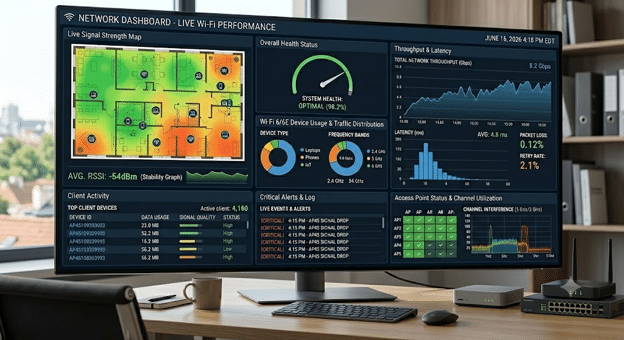
Monitor Network Performance Continuously
Wireless networks are not set-and-forget systems. Continuous monitoring helps identify issues before they affect users.
Key metrics to track
- Signal strength across floors
- Device density per access point
- Bandwidth usage
- Latency and packet loss
- Roaming performance between access points
Ongoing visibility allows IT teams or providers offering managed IT networking services to make real-time adjustments and long-term improvements.
This approach also supports proactive Wi-Fi troubleshooting for business, reducing downtime and support tickets.
Plan for Future Growth
A good wireless network should grow with your business, not limit it.
When planning ahead, consider:
- Increasing device counts per employee
- Hybrid and remote work connectivity needs
- Cloud-based applications and data usage
- Higher demand for video conferencing
- Expansion to additional floors or locations
Future-ready office Wi-Fi solutions are built with scalability in mind, allowing new access points and capacity upgrades without redesigning the entire system.
Common Wi-Fi Optimization Mistakes
Even well-intentioned setups can fail if key planning steps are missed.
Avoid these common mistakes:
- Relying on a single access point per floor
- Using consumer-grade hardware in office environments
- Ignoring interference sources
- Skipping professional site surveys
- Failing to monitor performance over time
These mistakes often lead to recurring connectivity issues and unnecessary troubleshooting costs.
Frequently Asked Questions
What is the best way to improve Wi-Fi in a multi-floor office?
The most effective approach combines a professional site survey, proper access point placement, and business-grade hardware designed for high-density environments.
Why does Wi-Fi get weaker on higher floors?
Signals degrade as they pass through concrete, steel, and building infrastructure, which is why multi-floor environments need carefully planned coverage.
How many access points do I need per floor?
It depends on layout, materials, and user density. A site survey is the only reliable way to determine accurate requirements.
What is the difference between consumer and business Wi-Fi systems?
Business systems support more users, offer centralized management, and provide stronger reliability and security compared to consumer devices.
How often should I review my Wi-Fi setup?
At least once a year, or whenever you add staff, expand floors, or adopt new cloud-based systems.
Can managed services help improve office Wi-Fi?
Yes. Providers offering managed IT networking services can monitor, optimize, and maintain performance continuously.
Strong Wi-Fi Drives Business Productivity
Reliable wireless connectivity plays a direct role in how smoothly your business operates each day. In multi-floor offices, success comes down to thoughtful planning, proper hardware selection, and ongoing attention to performance.
When your network is built using structured Wi-Fi network design principles, employees stay connected without interruptions, collaboration improves, and downtime drops significantly. Investing in professional office Wi-Fi solutions is not just about speed, it is about creating a stable foundation for everyday work.
If your team is dealing with slow connections, dead zones, or inconsistent performance, it may be time to reassess your setup. Call Tech Masters today or schedule a meeting to discuss how to improve your multi-floor Wi-Fi coverage and build a network that keeps your business running without interruption.