Technology failures rarely happen without warning. Slow systems, failed backups, and hardware issues often show signs of trouble before they become major disruptions.
It’s still common for small and medium-sized businesses (SMBs) to rely on a reactive “break-fix” approach to IT. The problem is that waiting until something breaks often results in lost productivity, emergency repair costs, and frustrated employees.
Remote Monitoring and Management (RMM) offers a proactive solution. By continuously monitoring your IT environment, it helps identify and resolve issues before they disrupt your business.
In this guide, you’ll learn what RMM is, how it helps reduce downtime, lowers IT costs, and why it has become an essential part of managed IT services for growing businesses throughout Edmonton and Calgary.
Short Summary
Remote Monitoring and Management (RMM) helps businesses detect and resolve IT issues before they become costly outages. By continuously monitoring systems, networks, and devices, RMM improves reliability, strengthens cybersecurity, reduces emergency repairs, and helps businesses in Edmonton and Calgary better manage long-term IT costs while keeping employees productive.
What Is Remote Monitoring and Management (RMM)?
Remote Monitoring and Management (RMM) is software that allows IT professionals to continuously monitor computers, servers, networks, and connected devices, identifying issues before they become major business disruptions.
Think of RMM as an early warning system for your business technology. Small software agents are installed on your devices to collect performance and health data. That information is securely sent to a central dashboard where technicians can monitor your systems around the clock.
RMM can monitor virtually every part of your IT environment, including:
- Servers
- Workstations
- Laptops
- Firewalls
- Routers
- Network switches
- Cloud infrastructure
- Backup systems
Why Reactive IT Costs Businesses More
When technology stops working, your employees can’t do their jobs. Projects are delayed, customer service suffers, and revenue can be affected.
Reactive IT often leads to:
- Employee downtime
- Lost productivity
- Lost revenue
- Emergency repair costs
- Overtime labour
- Customer frustration
- Reputational damage
Imagine arriving at work only to discover your file server has run out of storage overnight. Or finding out your backups haven’t been running for weeks after a hardware failure. These situations are stressful, expensive, and often preventable.
With proactive monitoring by a professional managed IT services, warning signs such as low disk space, hardware issues, and system performance concerns can be identified before they become major problems.
How RMM Prevents Downtime
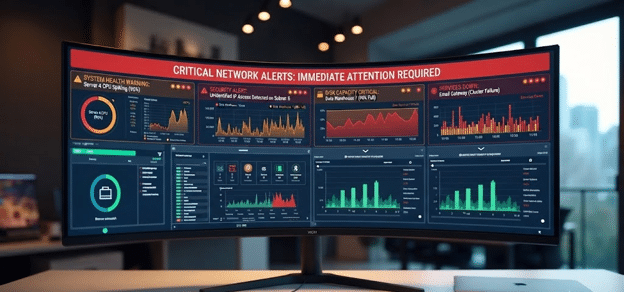
RMM continuously monitors your IT infrastructure and alerts technicians when warning signs appear, allowing many problems to be resolved before users even notice.
Proactive Monitoring
Your systems are monitored 24/7 for performance issues, including:
- CPU utilization
- Memory usage
- Disk space
- Network performance
- Server health
Rather than waiting for employees to report problems, technicians receive alerts as soon as something falls outside normal operating conditions.
Automated Alerts
RMM can automatically notify your IT provider when it detects:
- Failed backups
- Hard drive failures
- High server temperatures
- Security alerts
- Service failures
- Low disk space
Early notifications allow problems to be addressed before they impact daily operations.
Remote Resolution
Most routine issues can be resolved remotely, including:
- Restarting services
- Installing patches
- Applying software updates
- Removing malware
- Troubleshooting user issues
Remote support reduces downtime, eliminates unnecessary on-site visits, and gets your employees back to work faster.
Ways RMM Helps Lower IT Costs
- 1. Fewer Emergency Repairs: Catching problems early helps avoid expensive after-hours support and emergency service calls.
- 2. Longer Hardware Lifespans: Routine monitoring identifies overheating, storage limitations, and failing components before they cause permanent damage, helping extend the life of your equipment.
- 3. Better Patch Management: Automated updates help keep operating systems and software current, reducing security risks, bugs, and compatibility issues.
- 4. Reduced On-Site Service Calls: Routine support can often be completed remotely, saving time, reducing travel, and lowering service costs.
- 5. Predictable IT Budgeting: Proactive maintenance reduces unexpected repair bills and makes monthly IT expenses easier to plan.
Security Benefits of RMM
RMM plays an important role in strengthening your cybersecurity posture by helping IT professionals monitor the health and security of your environment.
Key security features include:
- Continuous endpoint monitoring
- Automated patch management
- Vulnerability detection
- Antivirus monitoring
- Backup monitoring
- Suspicious activity alerts
- Compliance reporting
While RMM is a valuable security tool, it isn’t a complete cybersecurity solution. It works best alongside firewalls, endpoint protection, multi-factor authentication, email security, and employee awareness training.
What Can Be Monitored with RMM?
Comprehensive IT infrastructure monitoring and server monitoring help identify small issues before they grow into major disruptions.
| Devices & Systems Monitored by RMM | |
|---|---|
| Servers | Desktop computers |
| Laptops | Firewalls |
| Routers | Network switches |
| NAS devices | Printers |
| Microsoft 365 | Cloud infrastructure |
| Backup systems | UPS devices |

Is RMM Right for Every SMB?
Almost every business that depends on technology can benefit from RMM, especially those with growing teams or limited internal IT resources.
Industries that commonly use RMM include:
- Professional services
- Accounting firms
- Law offices
- Manufacturers
- Healthcare providers
- Engineering firms
- Retail businesses
- Construction companies
- Multi-location organizations
RMM is worth considering if your business experiences:
- Frequent downtime
- A growing workforce
- Remote or hybrid employees
- Aging servers
- Compliance requirements
- Limited in-house IT support
If your business relies on technology to serve customers and keep operations running, proactive monitoring can save both time and money.
Why Partner with a Managed IT Provider for RMM?
RMM software can generate alerts, but it still takes experienced technicians to investigate issues, prioritize risks, and resolve problems quickly.
Working with a managed IT services provider gives you access to:
- Experienced technicians
- 24/7 monitoring
- Preventive maintenance
- Strategic IT planning
- Security expertise
- Hardware lifecycle planning
- Technology roadmaps
At Tech Masters, we combine advanced RMM tools with proactive support to help businesses across Edmonton and Calgary reduce downtime, improve system performance, and plan for future growth.
Stop Problems Before They Impact Your Business
Technology problems don’t have to catch your business off guard. With remote monitoring and management, potential issues can be detected and resolved before they disrupt your employees or customers.
If your business is still waiting for IT problems to happen before taking action, it may be time for a better approach. Tech Masters provides comprehensive remote monitoring and management (RMM) solutions for businesses throughout Edmonton and Calgary, helping you stay productive, secure, and focused on what matters most.
Frequently Asked Questions About RMM
How does Remote Monitoring and Management (RMM) work?
RMM uses lightweight software agents installed on computers, servers, and other connected devices to collect performance and health data. If a device shows signs of a problem, the system automatically alerts your Managed IT provider so they can investigate and often resolve the issue before it affects your business.
Is RMM only for large businesses?
No. Small and medium-sized businesses often benefit the most because they typically have limited internal IT resources. RMM provides continuous monitoring and proactive support without the cost of maintaining a large in-house IT department.
Can RMM really reduce IT downtime?
Yes. One of the biggest advantages of RMM is its ability to detect problems early. By identifying issues before they become critical, technicians can often resolve them remotely, helping reduce IT downtime and avoid costly disruptions.
Does RMM improve cybersecurity?
Yes. RMM helps improve security by monitoring endpoints, deploying software updates, detecting vulnerabilities, tracking antivirus status, and alerting technicians to suspicious activity. It should be used alongside other security measures, including firewalls, endpoint protection, multi-factor authentication, and employee security awareness training.
Do technicians need to visit my office to fix problems?
Not always. Software updates, failed services, application issues, and many user support requests can be handled remotely. This allows problems to be resolved faster while reducing the need for on-site visits.
Is RMM worth the investment?
For most businesses, the answer is yes. Preventing even one major outage can save more than the cost of an RMM service. Along with reducing downtime, RMM improves system reliability, extends hardware life, strengthens cybersecurity, and makes IT costs more predictable.