
When email stops working, customer messages pile up. When shared files disappear, deadlines slip. Technology touches nearly everything your business does, so unreliable support quickly becomes everyone’s problem.
Good IT support for small business helps prevent disruptions, protect information, and keep systems suited to how you work. Fixing a laptop matters, but so does ensuring your next employee can start without borrowing someone else’s login.
In this article, we explain essential services, different support models, and what to expect from a managed IT service provider. You’ll also find ten signs your current arrangement needs reviewing and practical steps for changing partners without turning an ordinary workweek into a technology rescue mission.
What Does Small Business IT Support Include?
IT support covers the devices, networks, applications, accounts, and people your business relies on. The scope depends on your environment and agreement.
Common responsibilities include:
- Hardware and software troubleshooting
- Network and cloud management
- Employee account setup and removal
- Cybersecurity, updates, and patching
- Data backup and recovery
- Documentation and technology planning
For employees, IT help desk services provide a contact for login failures, application errors, and other everyday problems. Infrastructure management looks after the systems behind those applications.
Why Small Businesses Need Reliable IT Support
A six-person accounting firm can depend on technology as heavily as a much larger company. Losing client files during a deadline can bring work to a standstill.
Unreliable systems create quieter costs too. Employees repeat tasks, managers troubleshoot instead of managing, and unused subscriptions keep renewing.
Reliable support helps control these problems while protecting sensitive information. Your team needs usable technology and clear help when something goes wrong.
What Are the Different Types of IT Support?
Break/Fix IT Support
You contact a technician when something breaks and pay for repairs. This can suit limited technology needs, although costs and downtime are less predictable.
Managed IT Services
Managed IT support provides ongoing care under an agreement. Depending on the package, managed IT services can include maintenance, backups, patching, and daily support. Confirm the scope before assuming everything is covered.
In-House IT
Employees manage technology internally. They understand your business directly, but you must budget for staffing, training, tools, holiday coverage, and specialist expertise.
Co-Managed IT
Internal staff share responsibilities with an outside provider. Your team retains its business knowledge while gaining capacity or expertise in security, cloud systems, or other areas.
Reactive vs. Proactive IT Support: What's the Difference?
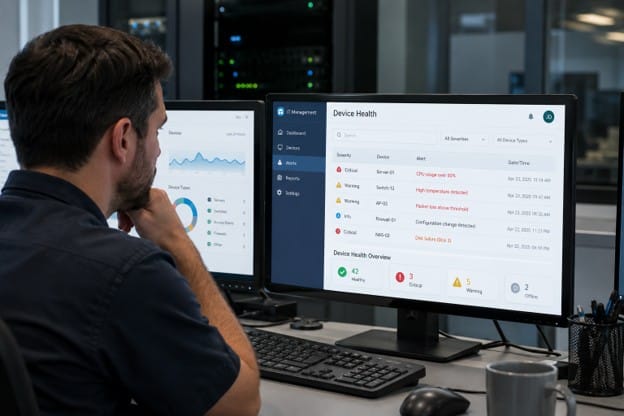
Reactive support starts after a problem occurs. Proactive support uses monitoring, maintenance, updates, and capacity planning to catch warning signs earlier.
A technician could investigate shrinking server storage before it stops accepting files. Tech Masters’ guide to how RMM reduces downtime and IT costs explains this approach.
Responsive troubleshooting still matters. Monitoring cannot prevent every outage, and an alert only helps when someone investigates it.
Cybersecurity Should Be Part of IT Support
Security belongs in everyday decisions, including employee onboarding, software updates, and access permissions.
Depending on your risks, protection should include:
- Multi-factor authentication, which adds another login verification step
- Device protection and email filtering
- Timely security patches
- Access limited to each employee’s needs
- Protected backups and employee training
- Monitoring and incident response
No single product handles every risk. Ask who investigates suspicious activity, disables compromised accounts, and updates your business during an incident.
Don't Overlook Data Backup and Recovery
A completed backup does not prove your business can recover successfully.
Know what is copied, how often backups run, where copies are stored, and how long they are retained. Assign responsibility for failures and require restoration tests.
Data recovery planning needs business priorities. Restoring payroll might be more urgent than recovering an old marketing folder.
If applications run on hosted infrastructure, clarify how managed hosting services divide responsibilities for servers, maintenance, and security. Confirm recovery arrangements separately, including acceptable downtime and data loss.
How Much IT Support Does a Small Business Need?
Start with business risk rather than employee count alone.
Consider devices, network complexity, cloud applications, remote workers, operating hours, sensitive information, industry requirements, and internal expertise. Growth plans matter too.
A clinic handling confidential records needs different safeguards from a retailer storing minimal customer information.
Choose IT services for small business around your operational requirements, with room to adjust as those needs change.
What Should You Expect from an IT Support Provider?
Expect written responsibilities, clear communication, and dependable processes for reporting and escalating problems.
Your agreement should define response targets, maintenance, security, recovery support, documentation, and reporting. Understand exclusions, project charges, and after-hours fees.
Planning should connect spending to business needs. Tech Masters’ business enhancement services address technology planning and operational requirements, helping owners assess investments beyond the next repair.
Questions to Ask Before Choosing an IT Support Provider
Ask for specific answers:
- What is included, excluded, or billed separately?
- How are requests prioritized and escalated?
- What response targets apply?
- Does after-hours coverage include staffed support?
- How are systems monitored and security incidents handled?
- Who manages backups and tests recovery?
- How are systems and administrator access documented?
- When will we review strategy and growth requirements?
Request an example report showing unresolved risks and upcoming decisions.
When Is It Time to Reassess Your IT Support?
These ten signs deserve attention:
1. Recurring downtime: Failures repeatedly interrupt work.
2. Slow responses: Urgent requests lack meaningful updates.
3. Temporary fixes: Underlying problems remain unresolved.
4. Security gaps: Updates and account controls are unclear.
5. Untested recovery: Nobody can demonstrate a successful restore.
6. Limited maintenance: Employees discover most problems.
7. Surprise expenses: Charges are poorly explained.
8. Missing documentation: System knowledge depends on one person.
9. No roadmap: Purchases happen only after failures.
10. Growth difficulties: New employees or locations overwhelm support.
One delayed ticket does not necessarily justify switching. Look for patterns and request an improvement plan.
For planning gaps, the guide to aligning IT with business goals offers a starting point for reviewing priorities.

How to Change Providers Without Unnecessary Disruption
Review notice periods, ownership terms, and handover responsibilities. Secure business-controlled access to domains, cloud accounts, licenses, backups, and documentation.
Have the incoming provider inventory systems and verify recovery options before changing tools. Schedule disruptive work outside critical periods and explain the new support process to employees.
Maintain necessary coverage during handover. Remove outgoing access after responsibilities transfer, then verify backups, monitoring, and support channels.
Tech Masters, IT Support To Help Your Business Move Forward
Effective IT support for small business helps employees work, protects information, and prepares systems for future needs. It combines responsive help with maintenance, recovery planning, and practical advice.
Review your arrangement against real priorities. Are recurring problems resolved? Can you recover essential data? Does your provider understand your growth plans?
Tech Masters helps businesses in Edmonton and Calgary assess technology needs and identify suitable support. Bring your frustrations, questions, and goals to the conversation so recommendations reflect how your business actually operates.
Frequently Asked Questions
Can a very small business benefit from ongoing support?
Yes. If losing email, files, or customer systems would interrupt operations, ongoing support can be worthwhile. Your technology dependence matters more than headcount alone.
Can IT support be delivered remotely?
Many account, software, and configuration problems can be handled remotely. Hardware replacements, cabling, and certain network faults require an on-site visit.
Does managed support include every technology expense?
Usually not. Hardware, subscriptions, major projects, and after-hours work can carry separate charges. Request written inclusions and exclusions before comparing provider quotes.
Does 24/7 monitoring mean immediate technical help?
Not necessarily. Monitoring can run continuously while staffed support follows different hours. Confirm who responds to alerts and which response targets apply.
Should cloud application data be backed up?
Check the application’s retention and recovery features against your requirements. Built-in tools might not cover every deletion, outage, or long-term retention need.
Can a provider work with our internal technician?
Yes. Co-managed support shares responsibilities. Define ownership of requests, maintenance, security, and projects so important work does not fall between the two teams.