Cyber threats are no longer just a large enterprise problem, SMB’s are increasingly targeted. In fact, small and medium-sized businesses often become prime targets because attackers assume your defences may not be as robust as those of bigger corporations. From ransomware locking up your files to phishing emails tricking employees into handing over credentials, the risks are real and growing.
In this guide, we outline a practical framework to help protect your business, data, and operations. We’ll cover essential IT security measures every SMB owner should address, from basic network protections to ongoing employee training and monitoring. Whether you run a retail shop, professional services firm, or e-commerce store, these steps will help safeguard your business from cyber threats without unnecessary complexity.
Why SMBs Need a Cybersecurity Checklist
If you’re a small business owner, keeping up with evolving cyber threats can feel overwhelming while you’re managing day-to-day operations. At the same time, ransomware and phishing attacks are increasing, and SMBs are often easy targets, where a single breach can disrupt business for days.
The impact can be serious, from locked data and downtime to lost revenue and unexpected costs. That’s why a clear IT security checklist is essential, it helps you stay organized, act proactively, and turn risks into manageable steps.
Core Cybersecurity Checklist for SMB Owners
Begin with these ten practical steps, each building on the last to create layered protection, even without technical expertise. Implement them incrementally and review progress monthly.
1. Secure Your Network
Your network is the gateway to your email, files, and customer data, so securing it is critical. Use firewalls to block unauthorized access, enable strong Wi-Fi encryption (like WPA3), avoid default passwords, and segment networks to keep business and guest access separate.
2. Implement Strong Access Controls
Weak logins are one of the easiest ways for attackers to gain access. Enforce strong passwords (at least 12 characters with a mix of letters, numbers, and symbols), avoid reuse, and use password managers to simplify management. Enable multi-factor authentication (MFA) across all systems and apply role-based access, giving employees only the permissions they need.
3. Keep Systems and Software Updated
Outdated software is a common entry point for attackers, so regular updates are essential. Set a monthly schedule to patch servers, computers, and applications, and enable automatic updates for operating systems, browsers, and plugins where possible. Replace any unsupported or end-of-life systems immediately, as they no longer receive security updates and can expose your business to risk.
4. Protect Endpoints and Devices
Every laptop, phone, and tablet is an endpoint that needs protection. Use reputable antivirus or endpoint security software with real-time scanning and behaviour monitoring. Secure all devices with full-disk encryption and enable remote-wipe capabilities, and require VPN use for any remote work. These measures help ensure your data stays protected even if a device is lost or stolen.
5. Back Up Your Data Regularly
Data loss can cripple operations overnight, so it’s essential to have a strong backup strategy. Follow the 3-2-1 rule: keep three copies of your data, on two different types of storage, with one stored off-site or in the cloud. A reliable backup system is one of the most effective cybersecurity best practices, allowing you to recover quickly from incidents like ransomware without paying a ransom.
For more tailored strategies, check out A Strategic Guide to SMB Data Backup from Tech Masters.
6. Train Your Employees
Your team is your first line of defence and sometimes your biggest vulnerability. Train employees to recognize phishing and social engineering using simple, real-world examples. Reinforce safe browsing and email habits, such as avoiding clicking on suspicious links, verifying sender addresses, and reporting unusual requests. Provide regular security awareness training, short monthly sessions or quick quizzes are often enough. When your team understands the “why,” they become active participants in protecting your business.
7. Monitor and Detect Threats
You can’t fix what you don’t see, so visibility is key. Use monitoring tools or managed security services to track unusual activity across your network, and set alerts for things like multiple failed logins, large data transfers, or unexpected software installs. Make it a habit to review logs regularly, even a quick weekly check helps. Many SMBs also rely on 24/7 expert oversight through managed services to close gaps without the cost of in-house staff.
8. Create an Incident Response Plan
Hope is not a strategy. Define steps to take during a cyberattack: who to contact first (IT partner, police, insurance), how to isolate affected systems, and when to notify customers. Assign roles and responsibilities so no one scrambles in panic. Include communication plans for staff, clients, and regulators. A simple documented plan can cut response time dramatically and limit damage.
9. Secure Cloud Applications
Most SMBs rely on cloud tools for email, storage, and accounting, so proper configuration is essential. Set permissions carefully and immediately remove access for former employees. Enable MFA and encryption across all cloud services, and regularly audit access and usage to identify any shadow IT or unauthorized apps. These steps help keep your data secure, even when it’s stored outside your office.
10. Work with a Trusted IT or Security Partner
You don’t have to do this alone. A managed IT or MSSP can provide expertise you may lack internally. They handle ongoing monitoring, patch management, and compliance checks while you focus on growth.
This partnership helps fill internal resource gaps and ensures continuous protection. Canadian providers like Tech Masters offer managed security services tailored for Western Canada businesses, including antivirus, backups, and threat intelligence.
How Often Should You Review Your Cybersecurity Checklist?
Treat this checklist as a living document. Review it at least annually during a dedicated “security day.”
Revisit after major changes, new systems, staff hires, or vendor switches, because each introduces fresh risks. After a security incident, conduct a full review within 30 days to close any holes exposed. Continuous monitoring is ideal. Monthly spot-checks on backups, updates, and access logs keep everything fresh without overwhelming your schedule.
Common Cybersecurity Gaps SMBs Miss
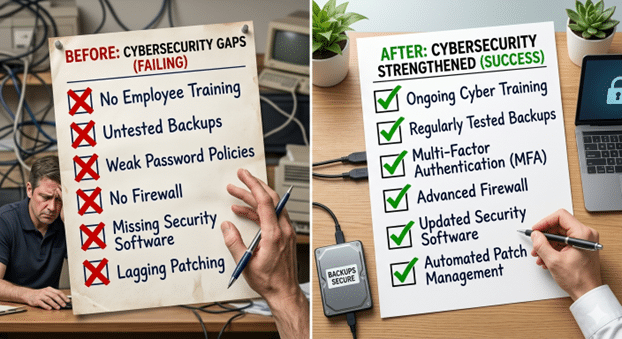
Even well-intentioned owners overlook these pitfalls. No employee training leaves your team vulnerable to clever phishing. Weak or reused passwords remain shockingly common, giving attackers easy access.
Lack of tested backups means you might discover too late that your recovery plan fails. Overlooking cloud security, especially third-party apps, creates hidden entry points. Finally, no formal response plan turns a minor incident into a full crisis.
For a deeper dive into these exact issues, read The Top 5 Security Gaps in SMBs And How to Fix Them.

Build a Stronger, Safer Business with Consistent Cybersecurity
Cybersecurity doesn’t need to be complicated, but it does need to be consistent. By following this IT security checklist, you remove the guesswork and take meaningful steps to protect your data, your customers, and your business. From securing your network to training your team, each action helps build a stronger, more resilient foundation.
The goal isn’t perfection, it’s steady, ongoing improvement. By implementing these steps and reviewing them regularly, you’ll strengthen your security posture and reduce risk over time. Cyber threats will continue to evolve, but with a proactive approach, you can stay ahead without becoming a technical expert.
Partner with a Canadian cybersecurity expert who understands SMB realities. Tech Masters offers end-to-end support including IT help desk services, managed hosting services, and full managed security solutions.
Book a consultation today and take control of your cybersecurity with confidence.
Frequently Asked Questions About Cybersecurity
What is the most important item on a cybersecurity checklist?
While every step matters, enabling multi-factor authentication (MFA) across all accounts and training employees to recognise phishing attacks usually deliver the biggest immediate impact. These two actions block the majority of common attacks that target SMBs.
How often should I update my IT security checklist?
Review your checklist at least once a year, and immediately after any major change such as adding new software, hiring staff, or moving to new cloud services. Continuous monitoring and quarterly spot-checks on backups and updates are also strongly recommended.
What are the top cybersecurity best practices every SMB owner should follow?
The most effective practices include using strong unique passwords with MFA, keeping all software and systems patched, following the 3-2-1 backup rule, providing regular employee security training, and working with a trusted provider for monitoring and incident response.
Do small businesses really need managed security services?
Yes. Most SMBs lack the time and expertise for 24/7 threat monitoring and rapid response. Managed security services combined with IT help desk support provide professional protection at a predictable monthly cost, significantly reducing the risk of costly breaches.
How can I protect my business from cyber threats if I have a limited budget?
Start with free or low-cost basics: enable MFA everywhere, use strong passwords, keep systems updated, train staff using free resources, and implement the 3-2-1 backup rule. Once the foundations are in place, add managed security services and reliable IT help desk support as your budget allows.
What should a small business do first if they suspect a cyberattack?
Immediately disconnect affected devices from the internet or network to contain the threat, avoid turning devices off (to preserve evidence), contact your IT help desk or security partner right away, and begin following your incident response plan. Notify authorities and customers as required by law.